Chronos POSDemo available · not yet certified

The till and the books, in one program.

Point-of-sale software designed for fiscalization in Kosovo. Sell at the counter, then close the month from the same place: books, declarations, purchases and payroll.

64-bit Windows · about 125 MB · 30-day demo

  • WindowsAvailable now
  • AndroidComing soon
  • iOSComing soon

In Albanian, English, Serbian and Turkish

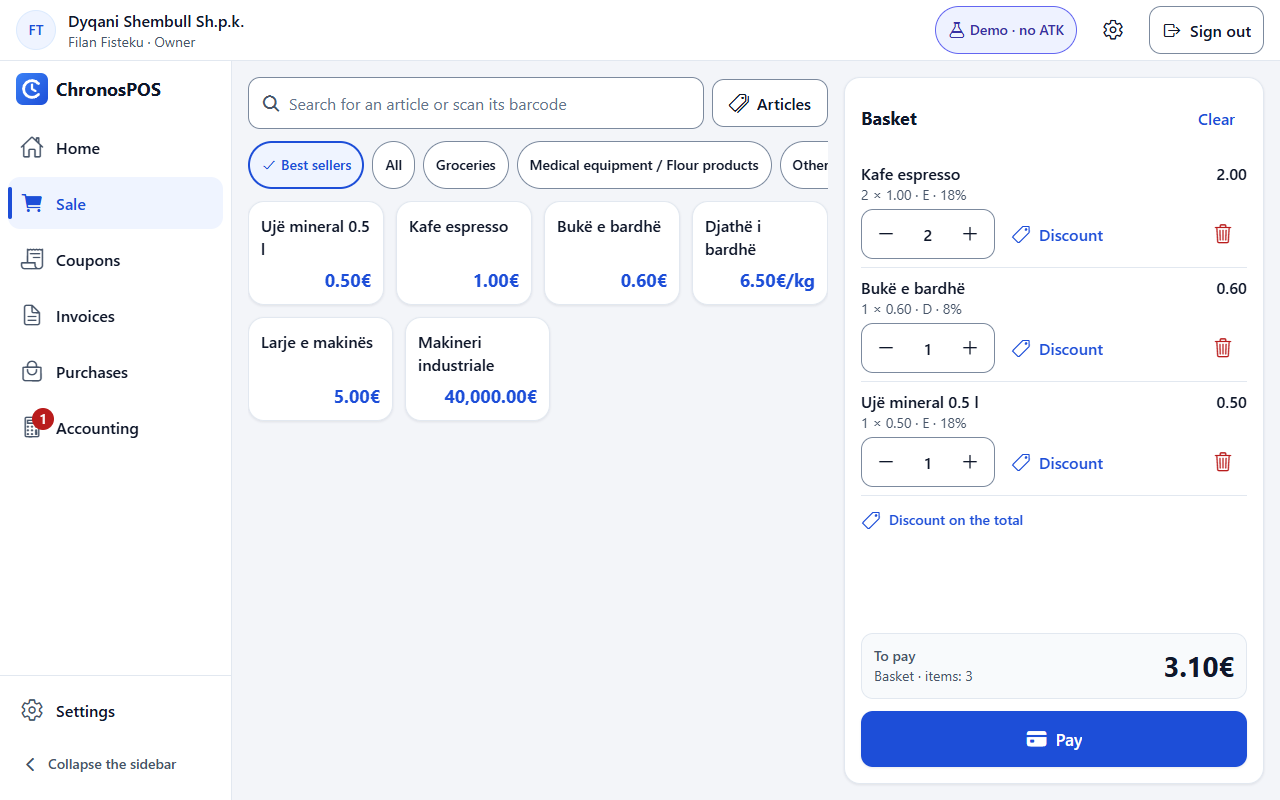
The sale screen of Chronos POS: articles in the middle, the basket and the amount to pay on the right.
Demo mode · practice data

Not yet certified. Chronos POS has not yet been certified by the Tax Administration of Kosovo, so it must not be used to issue fiscal coupons for real sales. The demo issues none: nothing reaches ATK, and every coupon it prints is marked as having no fiscal value.

From sale to declaration

One sale, all the way to the declarations.

What happens at the counter carries on into the books and the month’s forms, in the same program.

  1. Sale

    Search, tap and pay, by cash, card or voucher.

  2. Fiscal coupon

    Signed, with its QR code, laid out after ATK’s samples.

  3. Accounting

    The sales and purchase books, as in EDI.

  4. Tax declarations

    TV, QS, QL, WM, CM, WR and CD, prepared for you to check and file in EDI.

The books come with Chronos Plus, the declarations with Chronos Pro.

  • 36functions in Chronos Pro
  • 7tax forms prepared
  • 11internal-control rules
  • 48 hof selling without internet, as the law allows

The film

Chronos POS in twenty seconds.

From the sale to the fiscal coupon with its QR code, and on to the books and declarations. In Albanian.

What it does

From the first sale to the month’s declarations.

What is included depends on the package: see the prices.

Point of Sale

A sale in a few taps

Search by name or barcode, tap the article, choose how it was paid. Best sellers are one tap away, and on Windows the till can be worked from the keyboard.

Discounts and split payments

A discount on one article or on the whole basket, and one sale paid by cash, card and voucher together, with the change worked out.

Quantities as you measure them

Kilograms and grams, litres and millilitres, hours and minutes, each in the article’s own unit.

Fiscalization

Laid out after ATK’s samples

Signed, with its QR code and its numbers. It prints on 58 and 80 mm rolls, always in Albanian, and a second print is marked as a copy.

Returns and cancellations

Nothing is edited or deleted. A mistake is corrected by a new coupon that refers to the first, and coupons from the paper block can be entered afterwards.

Designed to sell without internet

Coupons are still issued and marked offline, then sent by themselves and in order once the connection is back. The law allows 48 hours, and the program warns as they pass.

Accounting

Books and declarations

Sales and purchase books, and forms TV, QS, QL, WM, CM, WR and CD laid out like ATK’s own, with a reminder before each deadline. You check them and file them in EDI.

Invoices to businesses

Invoices with credit and debit notes, on A4 or on the 80 mm roll, with or without a VAT number, and a register of customers.

The VAT rate

The law’s list of what carries 8% wherever a rate is chosen, and a suggestion when a name such as an electricity bill looks like it. It never changes a rate by itself.

Purchases & Inventory

Purchases by what they are

Investments, expenses and goods, line by line. Goods enter the stock, investments the asset register, and expenses the right box of form CD.

Stock

Costs, receipts and counts, and the stock list in Excel.

Payroll

Payroll

Employees, the month’s pay and payslips in Excel, feeding WM and CM. Type the net pay if that is what you know, and the gross is worked out.

Withholding tax

Withholding tax and the schedules of form CD, alongside the payroll.

Fixed Assets

The asset register

Depreciation for the books and for tax, and an asset’s sale or derecognition. Investments entered as purchases go straight into it.

Security & Internal Controls

Who can do what

Owner, accountant and cashier, each with their own PIN and permissions. A till left alone signs out by itself, and every action is logged.

Internal controls

Eleven rules raise alarms on cancellations, discounts, stock and gaps in sales, with a monthly report.

Your data stays with you

Records are encrypted on your own computer, and no server of ours holds them. A backup is made each day and on closing, to the folder you choose, sealed with your password.

The program

What you will see.

The sale: search, tap and pay.
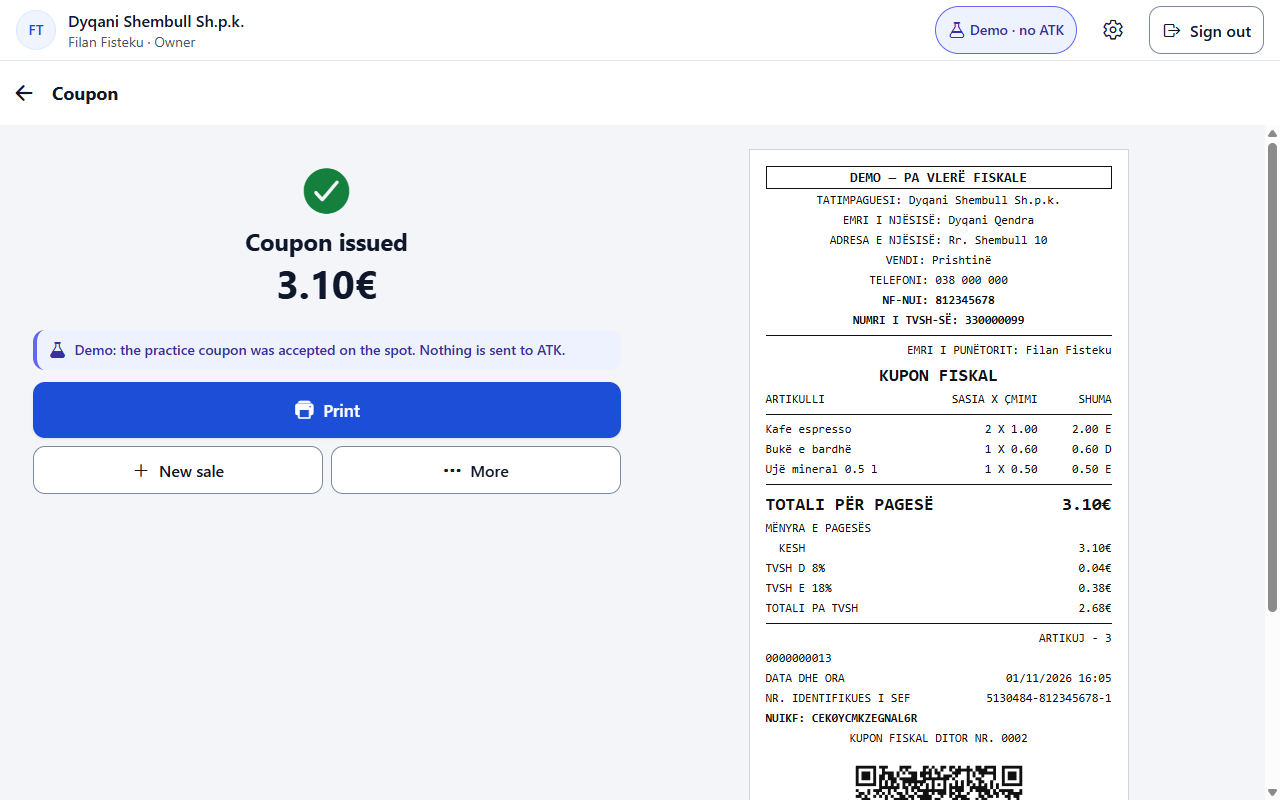
The coupon, marked as a demo. On a real one that line is gone.

Sell, then print the coupon.

  • Search by name or barcode, with best sellers one tap away.
  • Cash, card and voucher together in one sale.
  • The coupon with its QR code, on 58 or 80 mm rolls.
Compare the packages
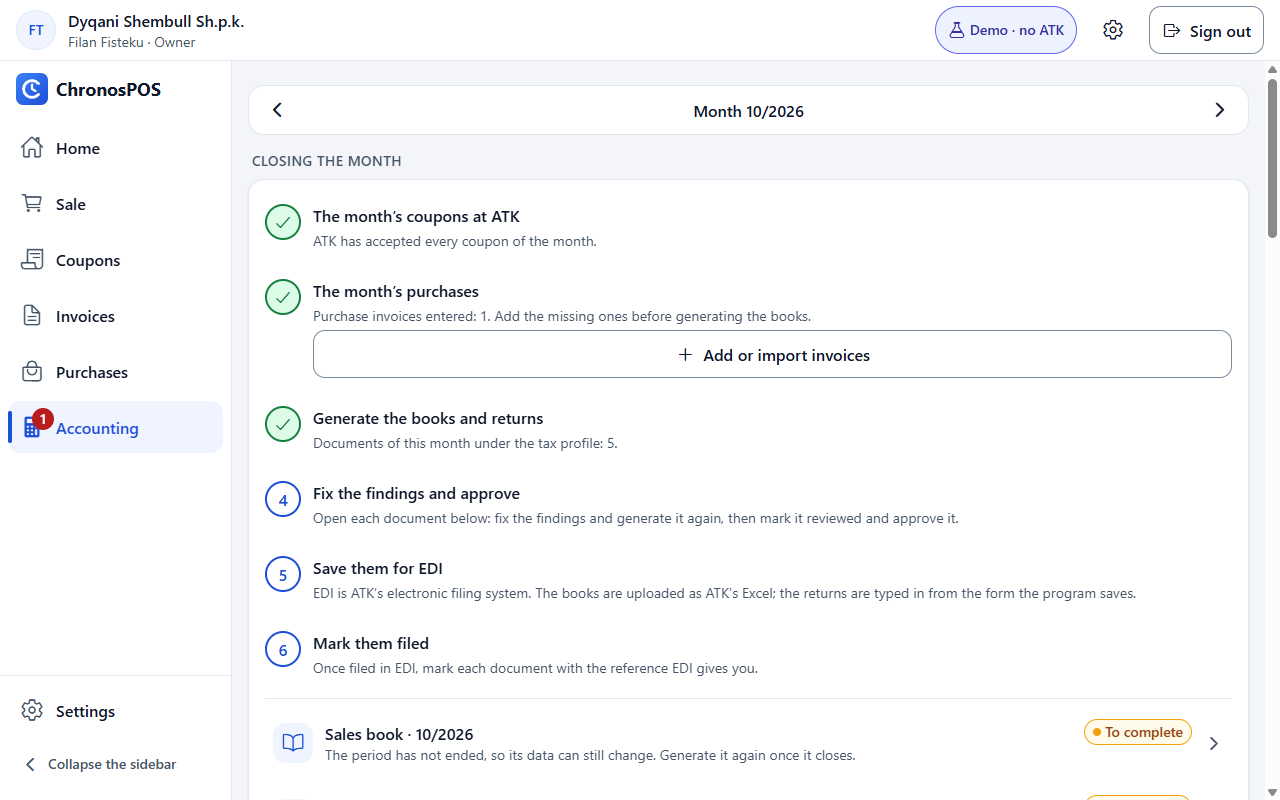
The month’s closing, step by step.
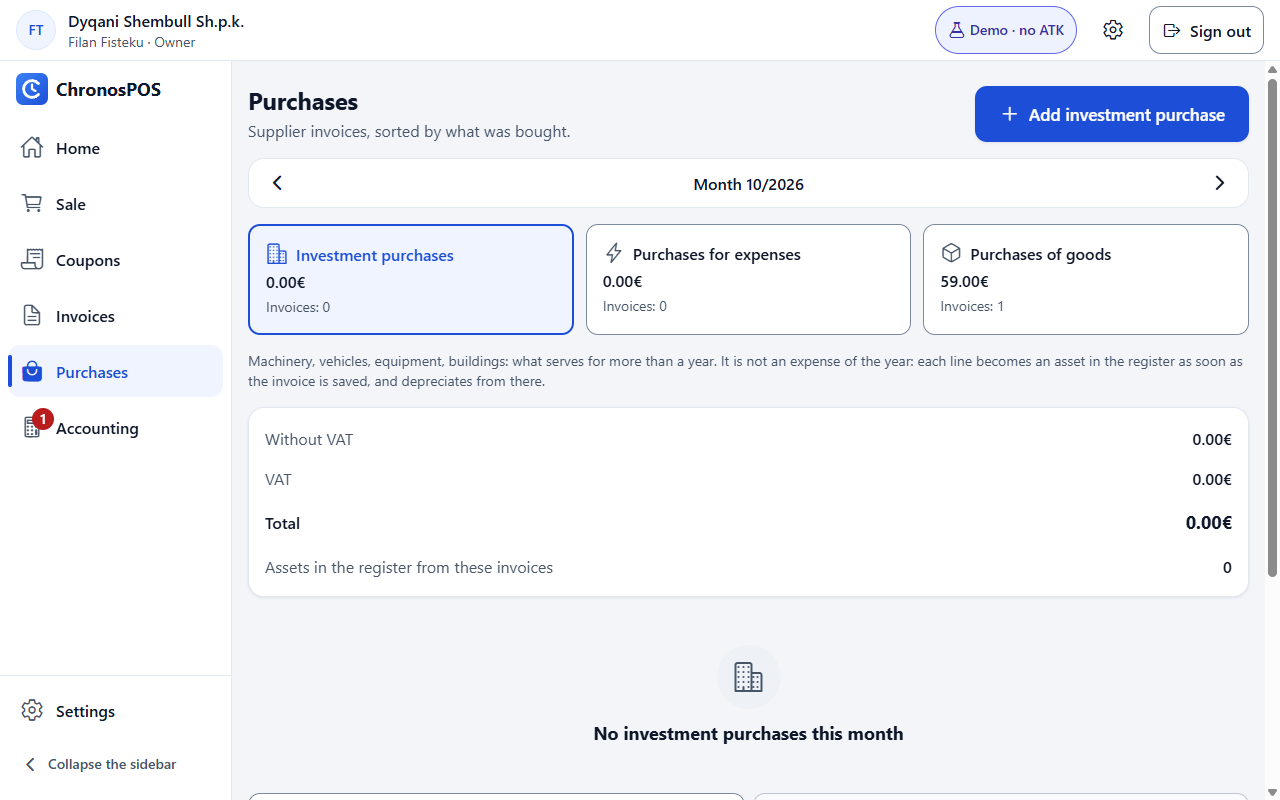
Purchases, split into investments, expenses and goods.

Close the month from the same place.

  • Six steps, from checking the coupons were sent to marking the forms as filed.
  • Purchases split into investments, expenses and goods.
  • The books saved as ATK’s Excel, ready for EDI.

Purchases and the books come with Chronos Plus, the month’s closing with Chronos Pro.

Compare the packages
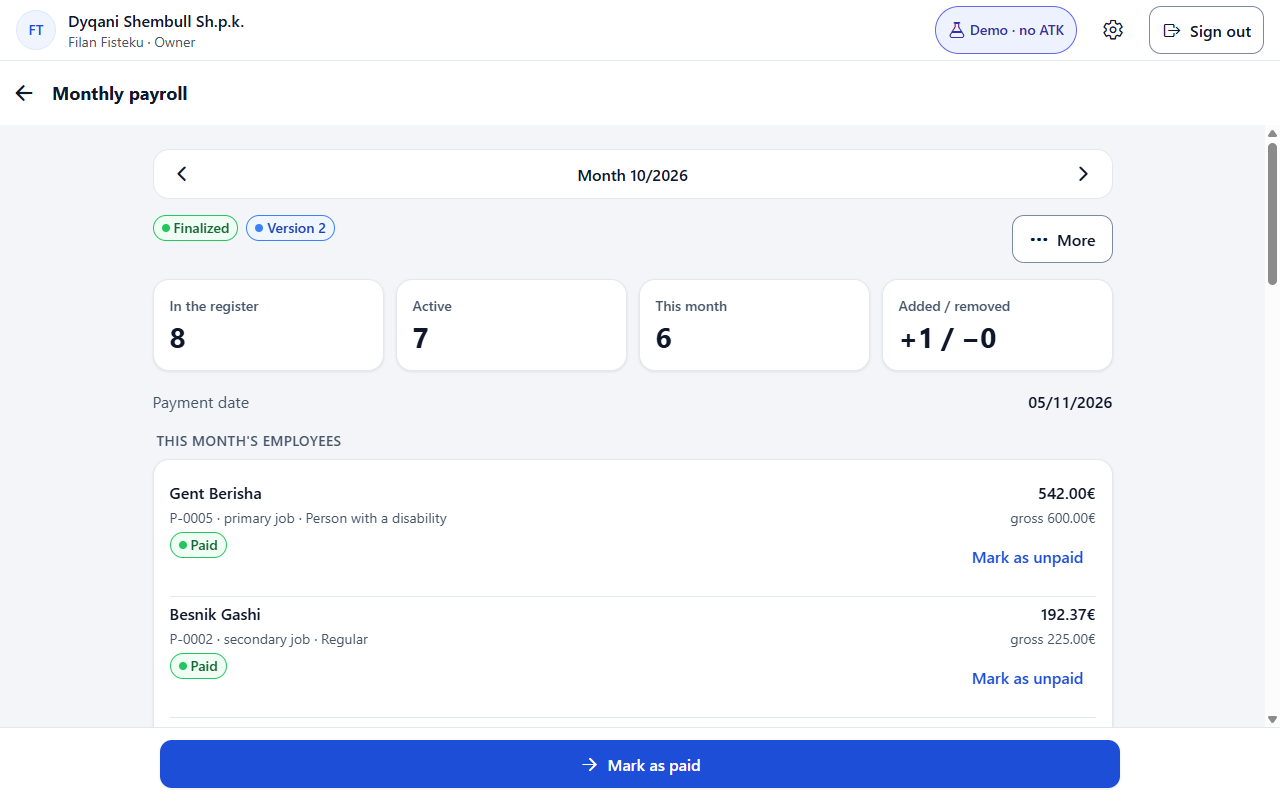
The month’s payroll, from draft to paid.

Pay people, and keep the register.

  • Type the net pay and the gross is worked out.
  • Payslips in Excel, feeding WM and CM.
  • An asset register with depreciation for the books and for tax.

Payroll and the asset register come with Chronos Pro.

Compare the packages

Screens from the Windows program, in its demo mode. The business, names and figures are practice data.

How it is used

From installing it to closing the month.

Install it

Download the installer and run it. Windows may warn you, because it is not signed yet: choose More info, then Run anyway.

Set it up once

The owner answers once: language, business, taxes, the till and their own PIN. It starts in Demo, where nothing reaches ATK.

Add your articles

Name, price with VAT, VAT rate, unit and category from ATK’s tables. The program points out where the law gives 8%.

Sell

Sign in with your PIN, tap the articles, press Pay and issue the coupon. In a certified till it goes to ATK first and is printed after.

Close the day

The day’s report shows the sales by payment and by VAT rate. Close the shift and see that every coupon has been reported.

Close the month

The Accounting place walks you through six steps: coupons sent, purchases entered, generate, fix and approve, save for EDI, mark as filed.

The licence

One licence for each till.

Licences will be issued once Chronos POS is certified. This is how they will work.

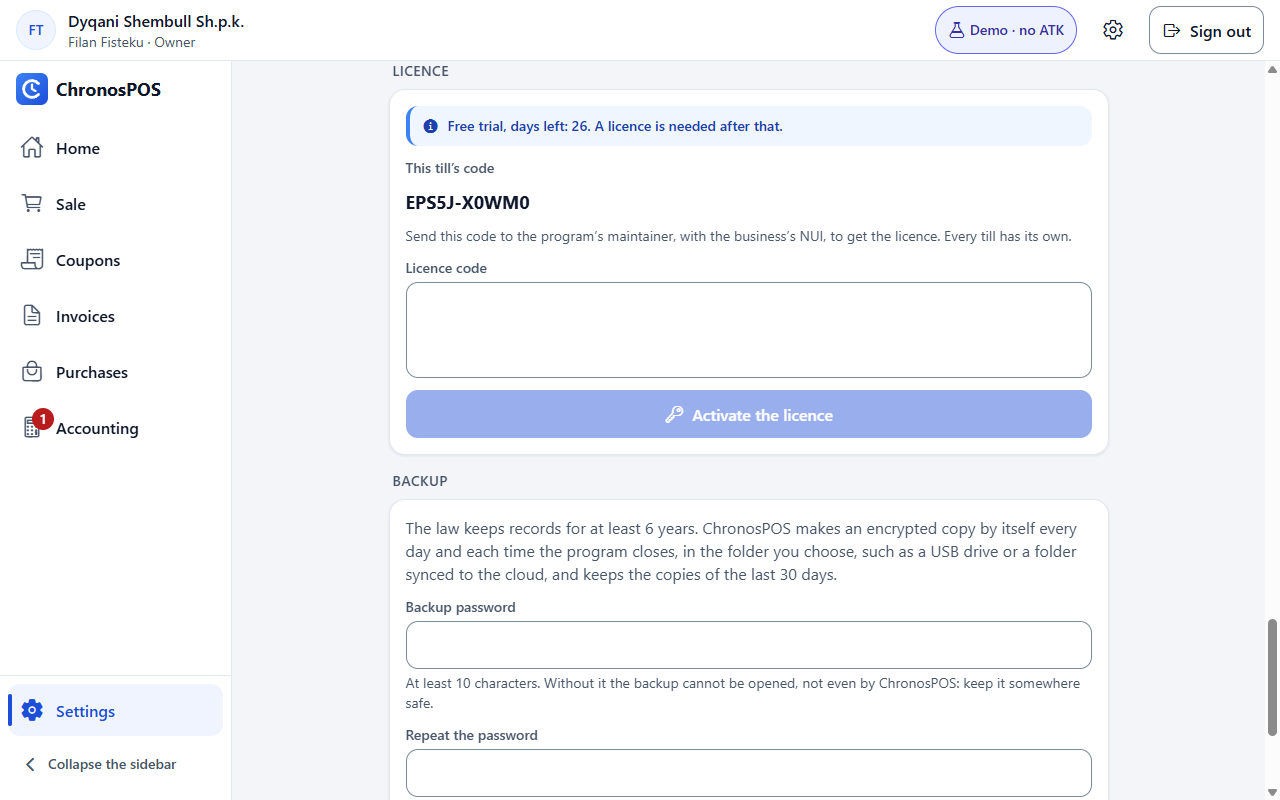
The licence: the till’s code, and the field for yours.

In demo mode, with practice data.

Try it first

Demo and Test run for 30 days on a computer with no licence. Production needs one from the first coupon.

How a till gets one

The owner sends the till’s code and the business’s NUI, both under Settings, Setup, Licence, and pastes back the code they receive. No server of ours is involved.

For how long

A month, six months or a year. A renewal carries on from the old end, so no days are gained or lost.

A new computer

It counts as a new till and gets a new code. Your records come back with your backup.

When it ends

The owner hears 30 days before and everyone 7 days before. Everything works for 15 more days, or 7 on a licence of a month or two. Then new sales, invoices and records stop.

What never stops

Sending coupons in the queue, returns, cancellations and credit notes, the history and reprints, reports, books and declarations, exports and backups. Nothing is deleted.

Prices

Launch prices for the first year.

Licences go on sale once Chronos POS is certified. Until then, the 30-day demo is free. Prices are without VAT, because the seller is not registered for VAT.

A year saves up to €51 against paying monthly.

Chronos Start

The till and invoices

€9/ month

€15−40%

Paid month by month

€50/ 6 months


Paid once for six months

€89/ year

€150−41%

Saves €19 against paying monthly

  • The fiscal coupon, returns and cancellations
  • Working offline
  • The shift and the daily report
  • Operators and backup
  • Invoices with credit and debit notes, on A4 and PDF
Try the demo

Chronos Plus

With purchases, stock and books

€15/ month

€25−40%

Paid month by month

€85/ 6 months


Paid once for six months

€149/ year

€250−40%

Saves €31 against paying monthly

  • Everything in Start
  • Purchases and stock
  • Sales and purchase books as in EDI
  • The official Excel file for the VAT books
  • Declaration deadlines and reminders
Try the demo

Chronos Pro

Most complete

With declarations, payroll and assets

€25/ month

€39−36%

Paid month by month

€140/ 6 months


Paid once for six months

€249/ year

€390−36%

Saves €51 against paying monthly

  • Everything in Plus
  • Forms TV, QS, QL, CD, WM, CM and WR
  • The month’s closing and yearly thresholds
  • Payroll and withholding tax
  • The asset register and internal controls
Try the demo
Compare every function
FunctionStartPlusPro
Sign-in and security
First-time setup in 5 steps (language, business, taxes, till, owner)✓✓✓
PIN sign-in, a wait after wrong PINs, changing the PIN✓✓✓
Owner, cashier and accountant roles, with 8 permissions per operator✓✓✓
Automatic sign-out when idle✓✓✓
Encrypted database, protected key, audit trail✓✓✓
Encrypted backup (daily and on closing) and restore✓✓✓
Four languages: Albanian, English, Serbian, Turkish✓✓✓
The till and the fiscal coupon
Articles with price, VAT rate, unit, ATK category and barcode✓✓✓
Sale with search, filters, best sellers and basket✓✓✓
Discounts per line and on the total✓✓✓
Payment by cash, card, voucher, or several at once✓✓✓
Fiscal coupon after Appendix F: QR, NUIKF, sent to ATK before printing✓✓✓
Partial and full returns, cancellations with a reason✓✓✓
Reprint marked "KOPJE E KUPONIT" and the coupon as PDF✓✓✓
Working offline (OFFLINE), sent by itself, with warnings at 24 and 48 hours✓✓✓
Coupons from the paper block after a breakdown✓✓✓
The shift: opening, summary, closing✓✓✓
Daily report, integrity check, CSV exports✓✓✓
Invoices
Customer register (Kosovo, abroad, international organisations)✓✓✓
Numbered invoices, with or without VAT✓✓✓
Credit and debit notes✓✓✓
Printing on A4 or 80 mm, and PDF✓✓✓
A warning for the invoice’s deadline (Article 44.4)✓✓✓
Purchases, stock and books
Purchases line by line–✓✓
Stock: cost, receipts, counts, the list in Excel–✓✓
Sales and purchase books as in EDI–✓✓
The official Excel file for the VAT books–✓✓
Declaration deadlines and reminders–✓✓
Accounting and taxes
Forms TV, QS, QL, CD (PDF and Excel)––✓
WM, CM, WR with the Excel lists––✓
The month’s closing in 6 steps, validation and versions––✓
The business’s taxes and yearly thresholds (VAT, real income)––✓
Payroll: employees, net pay, rules, payslips in Excel––✓
Withholding tax and the CD schedules––✓
Asset register: depreciation for the books and for tax, sale, derecognition––✓
Internal controls with 11 rules and a PDF report––✓
Number of functions232836
Launch price per month€9€15€25

Extras

Installation and registration with ATK

€40once per till

Free with a yearly licence in the first year.

A second till of the same business

€5a month in the first year

In any package. Later, 50% of the package’s price.

Chronos Pro with the declarations service

€60a month in the first year

Later €80 to €150 a month, by the size of the business.

Launch prices hold for 12 months from the date of the licence; after that the regular prices apply, shown struck through above. Customers who buy in the first 6 months after licences go on sale keep the launch price at their first renewal, as founding customers.

Have a question, or want a licence?

Call or write to us. Licences will be issued once Chronos POS is certified.

What it needs

A Windows computer and, for the coupon, a printer.

64-bit Windows

Tried on Windows 11. Android and iOS are coming soon and are not available yet.

Internet

To report coupons to ATK. It keeps selling without it, within the 48 hours the law allows.

A printer

A thermal printer for 58 or 80 mm rolls with a Windows driver. Invoices also print on A4, and coupons can be saved as PDF.

Not for every business

Fuel stations and taxis need certified hardware, which it does not support.

Questions

What people ask first.

Is Chronos POS certified?

Not yet. It has to pass the application to the Tax Administration of Kosovo first, with testing against its service. Until then it must not be used for real sales.

What can I do with the demo?

Try everything with practice data for 30 days: sales, coupons, books and payroll. Nothing reaches ATK and no coupon has fiscal value.

Where is my data kept?

On your own computer, encrypted. Backups go to a folder you choose, sealed with your own password. We hold none of it.

Does it file my declarations?

No. It prepares them, you check them, and you file them in EDI with your own account. The only thing the program sends to ATK is the fiscal coupon.

What happens if my computer breaks?

Install the program on the new one and restore your backup there. The new computer counts as a new till, so it needs a new licence code.

What happens if I do not renew?

After the days of grace new sales stop, but your records stay yours: you can still read them, report on them, export them and back them up.

Can I change package later?

Yes. You get a new code for the same term and paste it into the program. Your data stays where it is. What you recorded in a part the new package does not include can be read and saved, but not changed.

Do the prices include VAT?

No. Prices are without VAT, because the seller is not registered for VAT.

Try it on your own computer.

The demo needs no licence and nothing you enter leaves your computer.